New Feature: Custom Prompts aka Reflection Questions
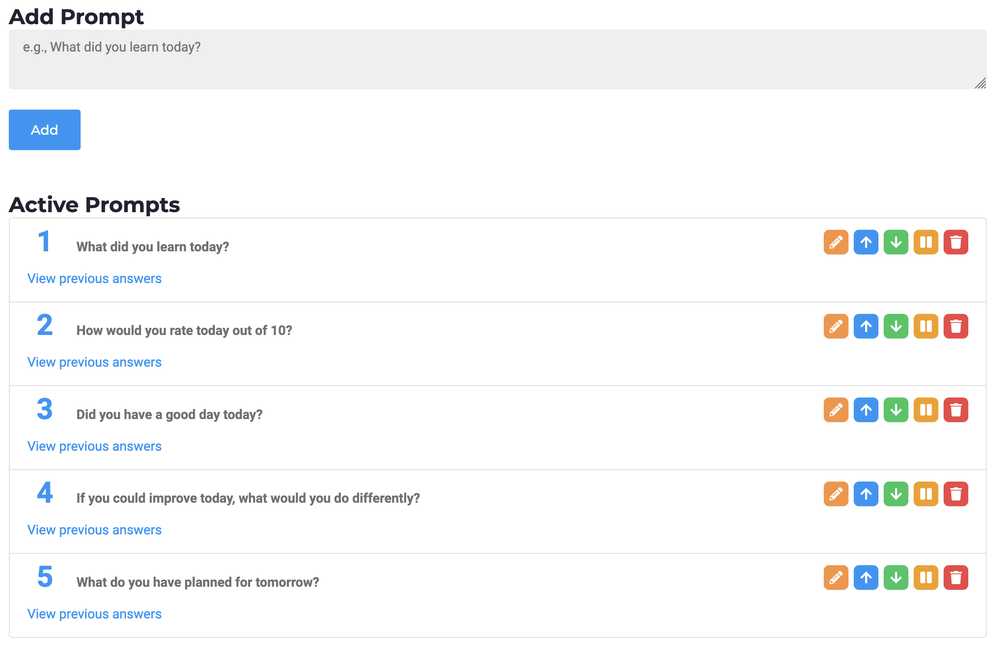
Under the Planner page, there is a new section called Prompts. Here you can add questions that you want to be asked every time you write a new journal entry. You can specify questions such as:
- What did you learn today?
- How would you rate today out of 10?
- Did you have a good day today?
- If you could improve today, what would you do differently?
- What do you have planned for tomorrow?
- And more
These questions will then appear under every journal entry that you write.
As long as you want these questions to appear, you can leave them active. If you no longer want them to appear, you can either pause them, which moves them to the "Inactive" section, or you can just delete them entirely. Deleting a prompt will also delete all the answers that you gave for it.
If you want to view a list of all the answers you have given to a prompt, simply press the "View Previous Answers" button.
We hope that you enjoy this new feature! Please let us know if you run into any bugs or issues.
Reflection Questions
When was this update deployed?
Wednesday, August 20th, 2025
Are there any new upcoming features?
Yes. We are planning lots of new updates such as revamping the entire Planner section and even coming up with mobile apps. Stay tuned!
Completed Activities on Aug. 20, 2025
No activities were completed on this date. Any progress or completions on any task on this date from your planner will be shown here.